Adding Arrays to the Array View
Depending on your settings, the Array View may open when you launch TotalView.
To open the view, or to add an array to the open view, right-click on an array in either the Local Variables view or the Data View, and click Add to Array View - Statistics, Visualize.
Figure 63. Adding a variable to the Array View from the Local Variables view

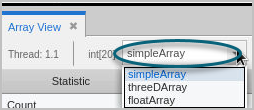
By repeating these steps, you can add any number of arrays to the Array View. When you add multiple arrays to the Array View, they appear in the Array Expression dropdown so you can easily switch between the arrays that you are examining.