View data in Fortran
This section demonstrates the display of data when debugging a Fortran program. The behavior of the Call Stack and Local Variables view is essentially the same, but the display differs to reflect Fortran-defined data.
On this page:
Viewing Modules and Their Data
Fortran 90 lets you place functions, subroutines, and variables inside modules. You can then include these modules elsewhere with a USE command. This command makes the names in the module available in the using compilation unit, unless you either exclude them with a USE ONLY statement or rename them. This means that you don’t need to explicitly qualify the name of a module function or variable from the Fortran source code.
When debugging this kind of information, you need to know the location of the function being called, so TotalView uses the following syntax when it displays a function contained in a module:
modulename‘functionname
Variable names are handled similarly:
modulename‘variablename
The above qualified syntax can be used with the Lookup File or Function view, and with the dprint command in the CLI:
dprint modulename‘variablename
Figure 39 illustrates some of the points made above.
Figure 39. Display of Fortran module data
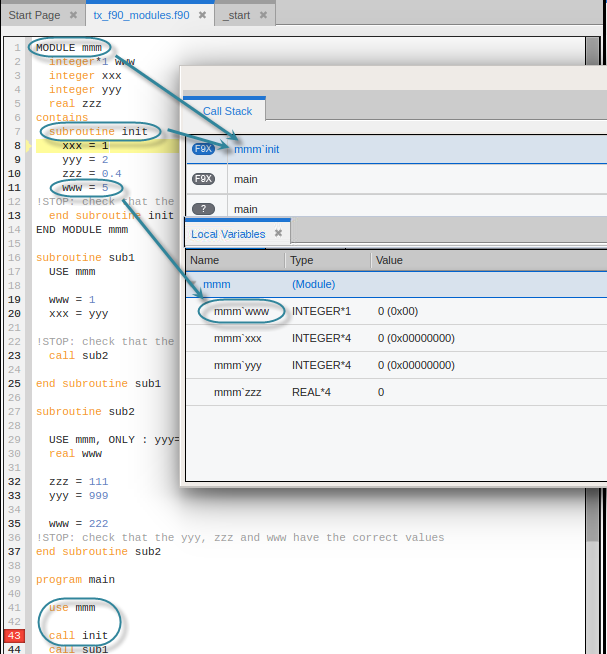
The qualified subroutine name appears in the Call Stack, and the qualified variable names appear in the Local Variables view. Note also that the init() routine can be called from main without qualification because of the USE statement.
Common Blocks
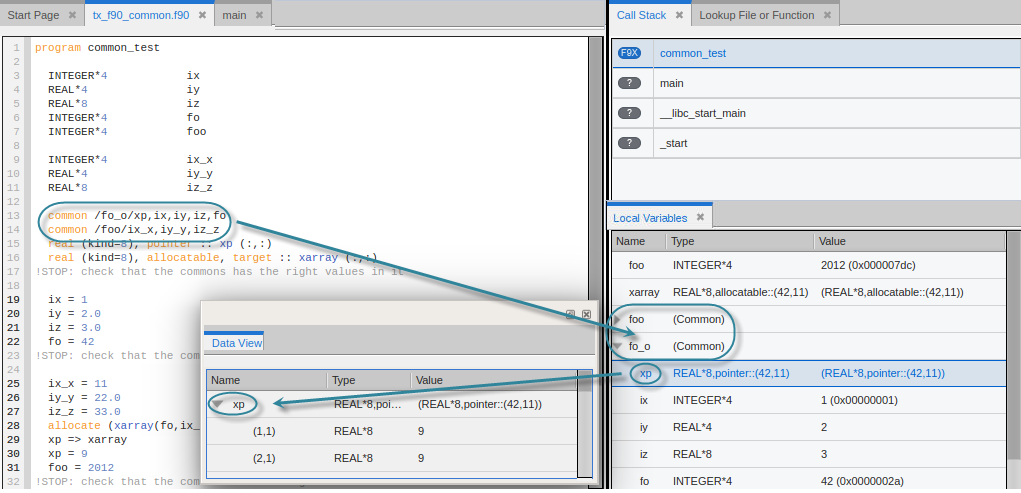
For each common block defined in the scope of a subroutine or function, TotalView creates an entry in that function’s common block list. The names of common block members have function scope, not global scope. If you select the function in the Call Stack, the common blocks and their variables appear in the Local Variables view. From there, of course, you can move those variables to the Data View to create expressions or cast a type, for example.
Figure 40 illustrates the handling of common blocks.
Figure 40. Fortran common blocks
Fortran 90 user-defined types
A Fortran 90 user-defined type is similar to a C structure. TotalView displays a user-defined type as type(name), the syntax used in Fortran 90 to create a user-defined type.
For example, the following code fragment defines two user types, foo and bar:
type foo
integer ifoo
end type foo
type bar
integer mdarray(2,3,4,5)
end type bar
And this code creates variables of these types, one a simple type, one an 20-dimensional array, and one a pointer:
type (bar), target :: just_a_bar
type (foo), dimension(20), target :: foo_array
type (foo), pointer, dimension(:) :: foo_p
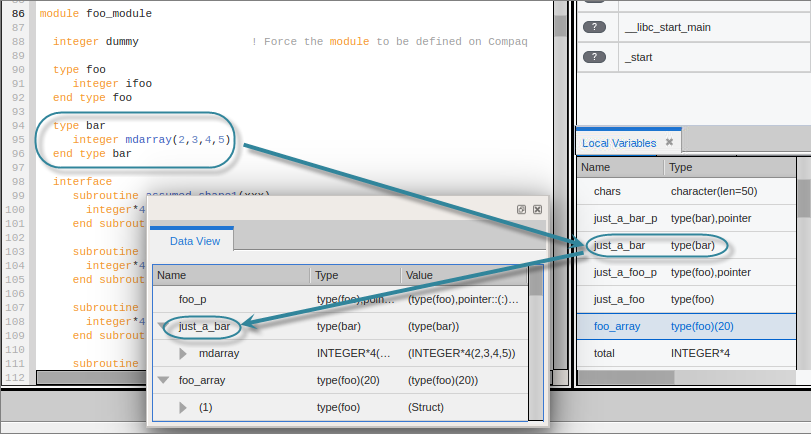
TotalView displays these in the Local Variables view, which you can then add to the Data View if you wish to create expressions or cast a type:
Figure 41. Fortran User-Defined Types
Fortran 90 deferred shape array types
Fortran 90 lets you define deferred shape arrays and pointers. The actual bounds of a deferred shape array are not determined until the array is allocated, the pointer is assigned, or, in the case of an assumed shape argument to a subroutine, the subroutine is called.
The following example shows the type of a deferred shape array of real data with no defined lower or upper bounds:
real, allocatable, dimension(:) :: aa1
Here is the unallocated array displayed in the Data View:
Figure 42. Fortran deferred shape array, unallocated

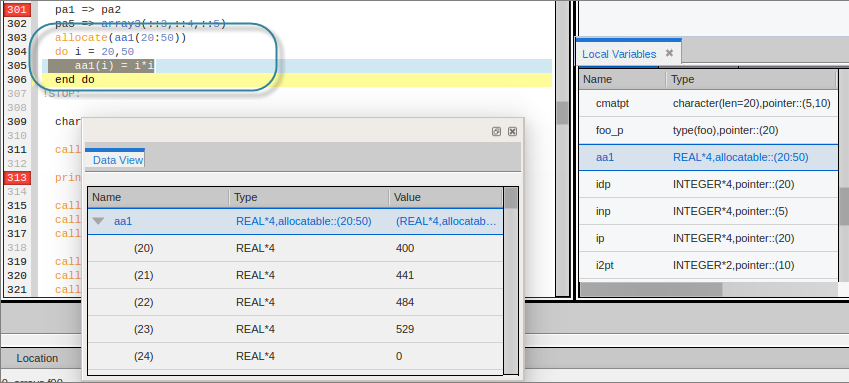
As you run the program, the array is allocated at line 303 below. Note that the type has been modified in the Data View.
Figure 43. Fortran deferred shape array
Fortran 90 pointer types
A Fortran 90 pointer type points to scalar or array types.
TotalView implicitly handles slicing operations that set up a pointer or assumed shape subroutine argument so that the indices and values it displays in the Local Variables view and Data View are the same as in the code. For example, this code sets up and assigns an array and a pointer to that array:
integer, target, dimension(5,2:10) :: ia21,ia22
integer, pointer, dimension(:,:) :: ip21, ip22
ip21 => ia21(::2, ::2)
Figure 44 displays the original array ia21 and its pointer ip21 in the Data View.
Figure 44. Original Fortran array
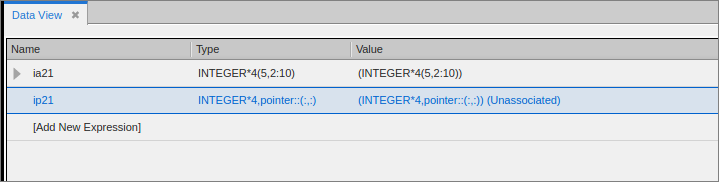
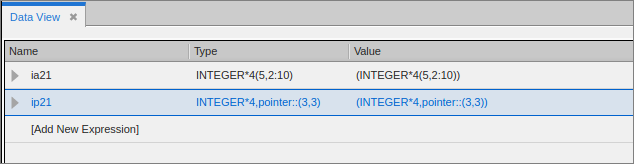
Figure 45 illustrates the pointer ip21 representing a slice of the ia21 array after the assignment of the pointer.
Figure 45. Fortran pointer representing an array slice
Fortran parameters
A Fortran PARAMETER defines a named constant. If your compiler generates debug information for parameters, they are displayed in the same way as any other variable. However, some compilers do not generate information that TotalView can use to determine the value of a PARAMETER. This means that you must make a few changes to your program if you want to see this type of information. For Fortran 90, you can define variables in a module that you initialize to the value of these PARAMETER constants; for example:
INCLUDE ‘PARAMS.INC’
MODULE CONSTS
SAVE
INTEGER PI_C = PI
...
END MODULE CONSTS
The PARAMS.INC file contains your parameter definitions. You then use these parameters to initialize variables in a module. After you compile and link this module into your program, the values of these parameter variables are visible. For Fortran 77, you can achieve the same results if you make the assignments in a common block and then include the block in main(). You can also use a block data subroutine to access this information.
Figure 46 assigns a parameter to a local variable for display in the Data View:
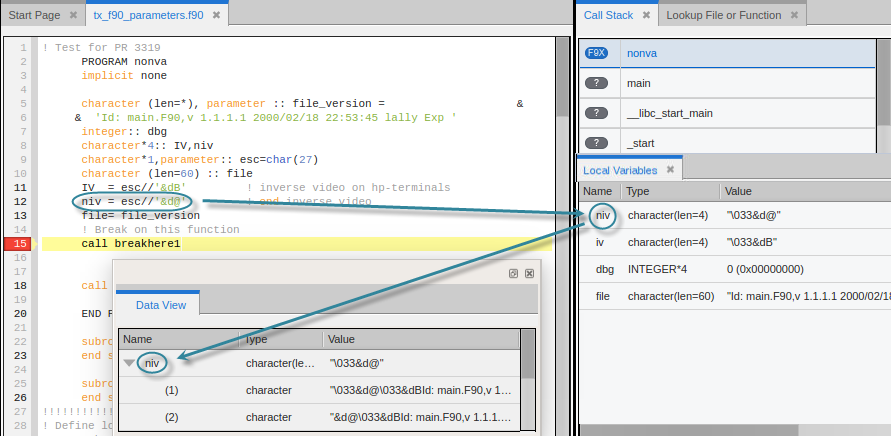
If the compiler provides enough information to look at parameters directly, then you can add the parameter directly to the Data View, like so:
Figure 47. Fortran parameters, added to Data View
