Processes & Threads View Basics
In Figure 80, the processes and threads are grouped by share group, process state, function, thread ID, and thread state.
There are four processes and a total of 12 threads (not all visible).
The share group is the set of processes executing the same program, and the executable program name is indicated in its attribute.
The focus is on thread 1.1, thread 1 of process 1, as indicated by its bold format.
The thread of focus determines the display in the Call Stack, Local Variables, Source, and Data View views.
Figure 80. Processes & Threads tree view
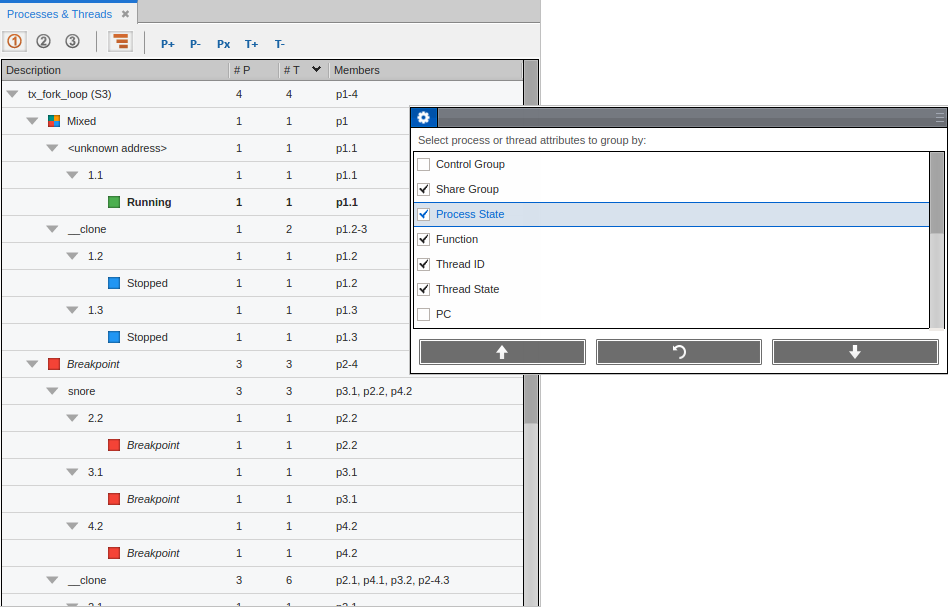
The status of processes and threads is highlighted by colored icons for easy identification. The “Mixed” icon identifies a process whose threads are in different states.
|
Controlling how action points works with processes and threads |
Action Point Behaviors in the Preferences chapter |
|
Action Point Properties for controlling whether it stops a group of processes, a single process (which includes all its threads), or a single thread. |