Change the process or thread of focus
The Processes & Threads view displays a maximum of 100 items, while some complex, multithreaded programs may have thousands of processes and threads. Those that are not displayed are shown as group “…”. Threads that are not displayed cannot be assigned the focus.
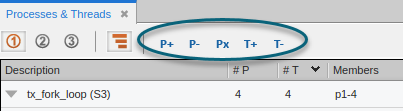
In cases like these, you can use the toolbar buttons ( ) to cycle through processes and threads one at a time, or jump directly to a specific process or thread.
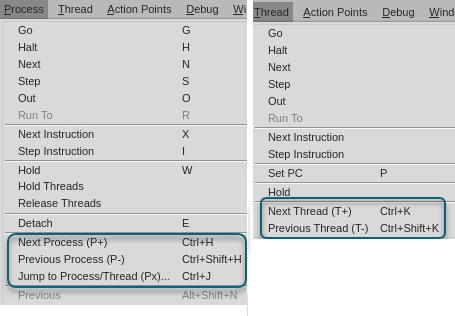
The Process and Thread menus also include these options:
On this page:
Cycle through processes and threads
Use the following procedures to cycle through processes and threads:
To cycle through processes in the current control group
-
Select P+ or P-, or use the menu options and select Process > Next Process or Process > Previous Process.
To cycle through threads within the process in focus
-
Select T+ or T-, or use the menu options and select Thread > Next Thread or Thread > Previous Thread.
P+ and P- loop through all processes. For example, if a program has 200 processes and the process in focus is #200, P+ moves the focus to process #1; if the current process in focus is #1, P- focuses on process #200. The same is true for T+ and T-, which cycle through threads.
The following table describes each button and its keyboard shortcut.
|
Button |
Description |
Keyboard Shortcut |
|
P+ |
Cycles to the first thread of the next process within a focus group. |
Ctrl+H |
|
P- |
Cycles to the first thread of the previous process within a focus group. |
Ctrl+Shift+H |
|
T+ |
Cycles to the next thread within a focus group. |
Ctrl+K |
|
T- |
Cycles to the previous thread within a focus group. |
Ctrl+Shift+K |
|
Px |
Opens the Jump To dialog. |
Ctrl+J |
Jump to a specific process or thread
-
Select Px on the toolbar, or press Ctrl+J.
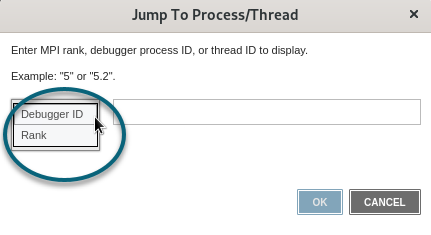
The Jump To dialog opens.
-
Select the type of identifier to enter:
-
Debugger ID: The process or thread ID, for example, 3 or 3.2. If you enter only 3, the focus moves to the first thread in the process, or 3.1.
-
Rank: For MPI programs, the rank, or unique identifier of the process, from 0 to n.
-
-
Enter the identifier, and then select OK.
The focus moves to the specified process or thread.