Set breakpoints in Python code
Set breakpoints in your code to control execution.
Before you begin, launch your Python program. See Launch single-process Python programs or Launch parallel Python programs.
On this page:
Find the code you want to debug
If your script calls a function defined in another file or module, use one of the following methods to navigate to that code before setting breakpoints:
-
In the Source view, right-click a function name and select Navigate to File or Function.
-
Select Edit > Lookup File or Function, enter a full or partial file or function name, and then select a result to open it in the Source view.
For more information, see Find files and functions using the Lookup File or Function view.
Set a breakpoint
Use one of the following methods in the Source view:
-
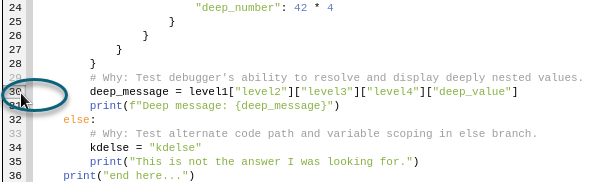
Select a line number in the gutter.
-
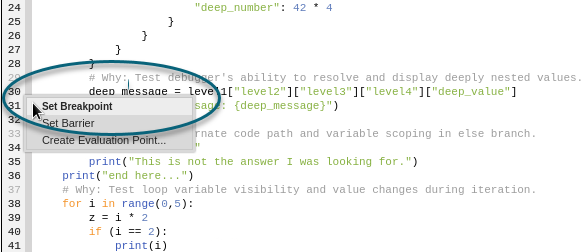
Right-click a line number and select Set Breakpoint.
-
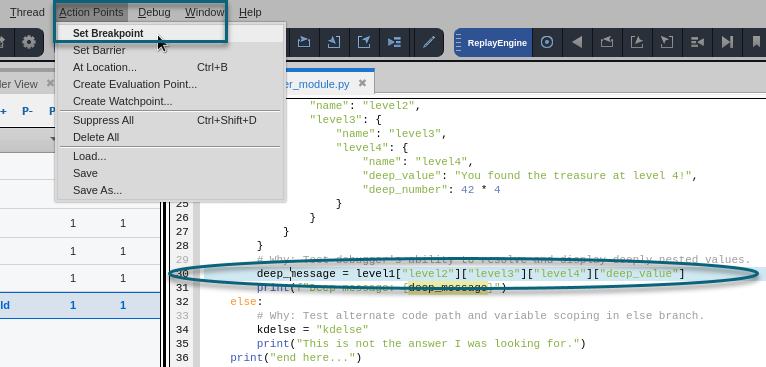
Select a line in the Source view, then select Action Points > Set Breakpoint.
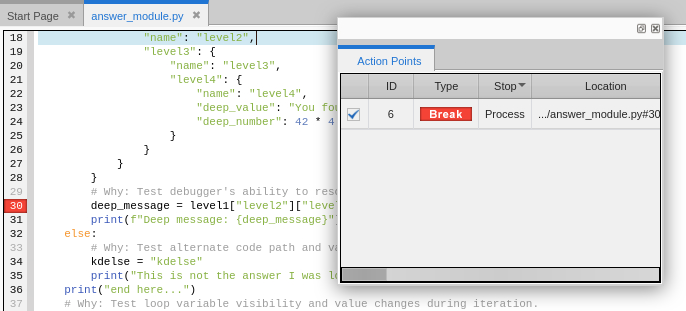
After you set the breakpoint, a marker appears in the gutter and the breakpoint is added to the Action Points view.
Manage a breakpoint
Right-click the breakpoint marker in the gutter and select the option you want.
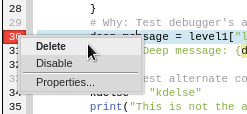
You can delete or disable the breakpoint, or select Properties to open the Modify BreakPoint dialog. To learn more about the Modify BreakPoint dialog, see Modifying a Breakpoint.
For more information about setting and managing breakpoints, see Breakpoints and dbreak.