Displaying ROCm Program Elements
On this page:
GPU Variable and Data Display
TotalView can display variables and data for a specific GPU work-item on a GPU agent. Changing the GPU focus for the GPU agent may also change the displayed data.
In the same way as when debugging CPU code, you can add an expression from the Local Variables view to the Data View or create new expressions in the Data View to analyze your data. The variables are contained within the lexical blocks in which they are defined.
Casting a Pointer to an Array
Casting works the same way as when debugging CPU code. See Casting to an Array in the Data View.
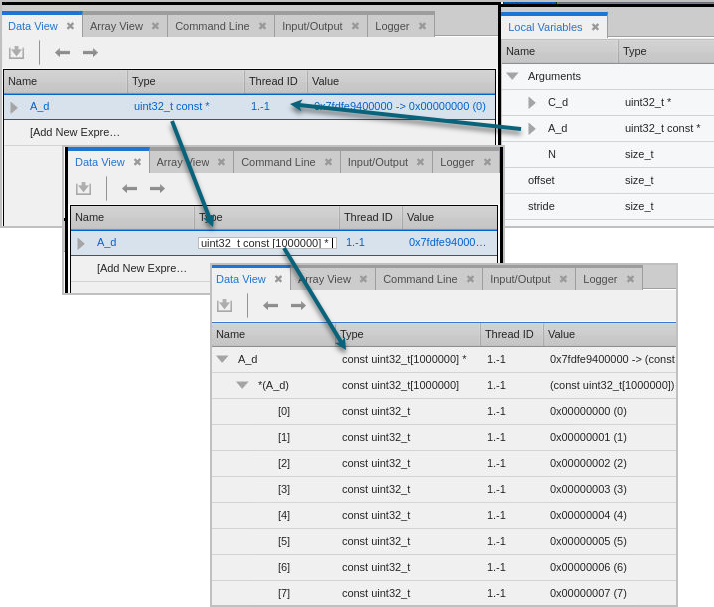
Here, let’s add the pointer A_d from the Local Variables view to the Data View, then edit the Type field to cast it to a pointer to an array of elements.
Below, A_d is defined in the program as a uint32_t const *, which is a pointer to a const uint32_t. However, we know from the value of N, A_d is actually a pointer to an array of 1,000,000 uint32_t elements.
To cast the pointer, edit the Type field to read uint32_t const [1000000] *, which, reading from right to left, is "a pointer to an array of 1,000,000 const uint32_t".
You can then dereference the pointer by expanding the tree control to see the array, and then expanding the array to show the elements.
Figure 163. Dereferencing a pointer in the Data View
See the Values of Built-in Variables
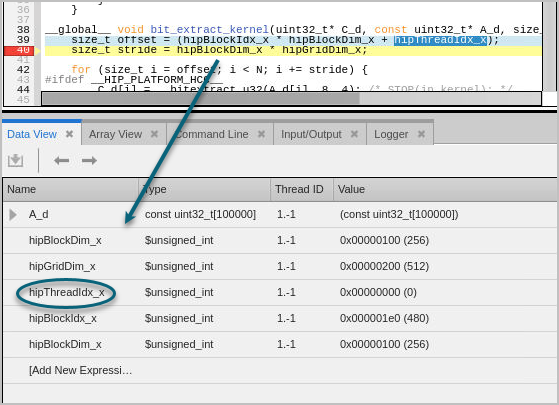
You can add ROCm built-in variables to the Data View from the Source pane to view information about the grid or the thread index, for example.
Figure 164. Adding built-in variables to the Data View
Change the Focus and the Data View Updates
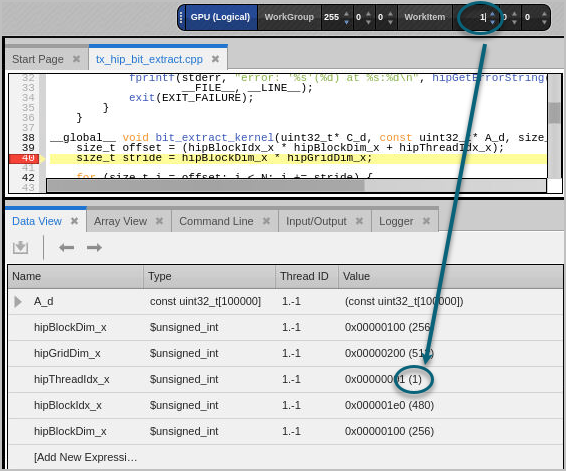
Note that the built-in variables, such as hipThreadIdx_x, reflect the GPU focus. If you change the focus in the GPU toolbar, the value of these variables may change.
Figure 165. Changing the work-item focus is reflected in the Data View
|
Using the Data View |
|
|
ROCm’s built-in variables |
|
|
ROCm’s GPU Toolbars |
ROCm Built-In Runtime Variables
TotalView allows access to the ROCm HIP built-in runtime variables, which are handled by TotalView like any other variables, except that you cannot change their values.
The supported ROCm HIP built-in runtime variables are as follows:
struct dim3_32 threadIdx;
struct dim3_32 blockIdx;
struct dim3_32 blockDim;
struct dim3_32 gridDim; // Grid sizes in work-group units
struct dim3_32 gridDimWorkItems; // Grid sizes in work-item units
int warpSize;
unsigned int hipThreadIdx_x, hipThreadIdx_y, hipThreadIdx_z;
unsigned int hipBlockIdx_x, hipBlockIdx_y, hipBlockIdx_z;
unsigned int hipBlockDim_x, hipBlockDim_y, hipBlockDim_z;
unsigned int hipGridDim_x, hipGridDim_y, hipGridDim_z;
The types of the built-in variables are defined as follows:
struct dim3_32 { unsigned int x, y, z; };