Debug a Python program
Before you begin, verify that your Python environment meets the Python debugging supported platforms and requirements.
The Python Session window of the Session Editor supports single-process native Python debugging. To learn more, see Launch single-process Python programs. To launch parallel native Python programs, see Launch parallel Python programs.
To start a Python debugging session using the Session Editor
-
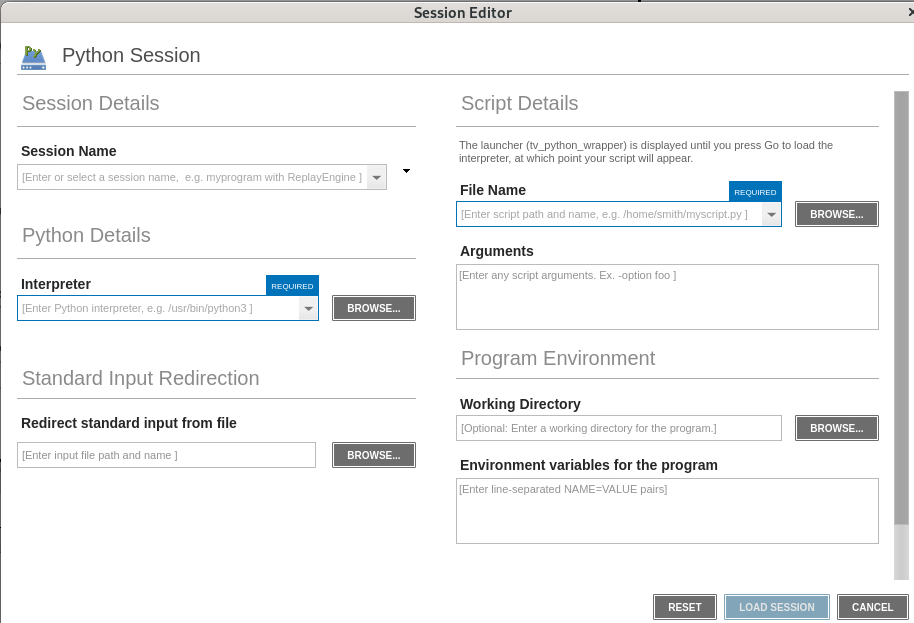
Open the Python Session window of the Session Editor using one of the following methods:
-
Select File > Debug a Python Program.
-
On the Start Page, select Debug a Python Program.
-
-
Enter a name in the Session Name field.
-
In Python Details, enter the path to the Python interpreter, or select Browse to locate and select the interpreter.
The interpreter must be an executable regular file, or a bare name such as
python3that is found on the debugger'sPATH. If you enter a relative path, TotalView resolves it from the session's working directory, if one is set. -
In Script Details, enter the script file name, or select Browse to locate and select the script.
The script must be readable, but it does not need to be executable. Its file name must end in
.pyor.pyw(case-insensitive), or its first line must be a shebang (#!) that identifies Python. -
(Optional) Complete one or more of the following to further configure the session:
-
Enter script arguments in the Arguments field.
-
Set the working directory. For details, see Program Environment.
-
Configure environment variables. For details, see Program Environment.
-
Configure standard input and output/error redirection. For details, see Standard Input and Output.
-
-
Select Load Session.
The Source view displays the Python wrapper program (tv_python_wrapper.c).
-
Select Go (
 ).
The Source view displays the Python script.
-
(Optional) Set any breakpoints you want in the Python code. See Set breakpoints in Python code.
-
Select Go (
) to run the Python script.
Previously used interpreters and scripts are available in their respective field histories. The script history is separate from the file name history in other windows of the Session Editor. The editor does not automatically discover installed interpreters, virtual environments, or conda environments.