Display thread names
In complex, multithreaded programs with thousands of threads, naming the threads that perform specific functions helps you sort and identify them in the Processes & Threads view.
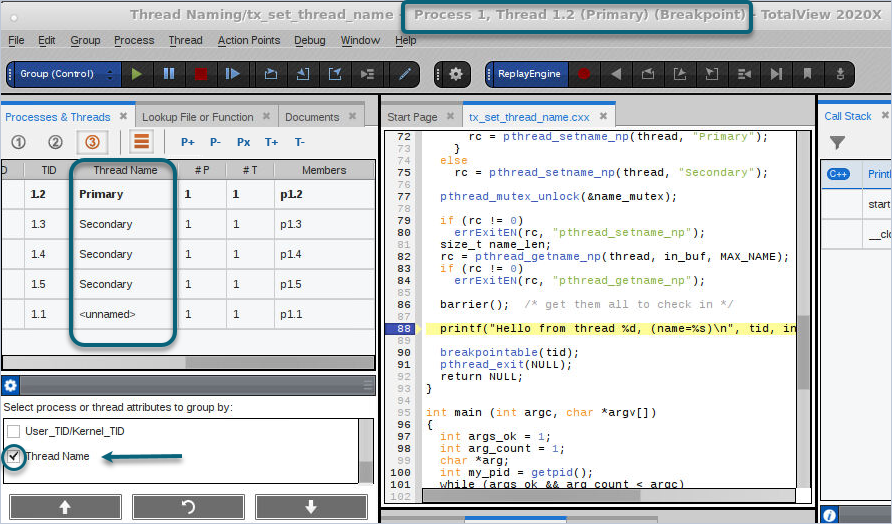
Threads are not named unless your program explicitly sets a name. When a thread name is set, TotalView displays it in these locations:
-
In the Processes & Threads view, when Thread Name is selected in the Configure panel. See Group processes and threads by attribute.
-
In the TotalView title bar.
On this page:
Set a thread name in your program
To display a thread name in the TotalView UI, set the name in your program by using the pthread_setname_np() function, as follows:
int rc = pthread_setname_np(thread, "MyThreadName");
For example, the program in the following figure sets the thread names "Primary" and "Secondary":
pthread_mutex_lock(&name_mutex);
int rc;
if (!first_in)
{
first_in = true;
rc = pthread_setname_np(thread, "Primary");
}
else
rc = pthread_setname_np(thread, "Secondary");
The first thread to enter the function is named “Primary”, and all subsequent threads are named “Secondary”.
Display thread IDs related to thread names
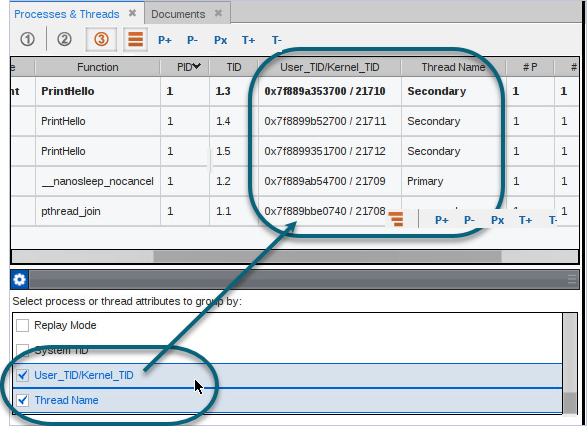
In addition to the thread name, you can display the system, user, and kernel thread IDs as columns in the Processes & Threads view.
-
If the Configure panel is not visible, drag the Configure bar to open it.

-
Select one or both of the following attributes:
-
System TID: Displays the systid, the target system thread ID.
-
User_TID/Kernel_TID: Displays the utid (user thread ID) and the ktid (kernel thread ID).
-
The selected attributes appear as columns in the Processes & Threads view. For a description of each attribute, see Attribute descriptions.
Thread name properties and CLI options
The thread command includes the following properties related to thread naming. The properties are read-only: you can access them but not set them.
-
thread_name: The name given to a thread by the application.
-
thread_ktid: The kernel thread ID.
-
thread_utid: The user thread ID (pthread_t).
The dstatus command has the following options and properties related to thread names:
-
-thread_name: Displays any thread names in a program, if they exist.
-
Properties on the -group_by option:
-
systid: Either the user thread ID (utid) or the kernel thread ID (ktid) if no utid exists.
-
utid_ktid: "utid / ktid" or only ktid if no utid exists.
-
tname: The thread name, or "<unnamed>" if no thread name exists.
-