Enabling and Disabling Wave-Thread Mode
When you launch or restart a process, the process’s current wave-thread mode determines whether the process starts in wave-thread mode or agent-thread mode. At any point during the lifetime of the process, you can switch the mode. After switching, the selected mode will be used when the process restarts.
You can enable and disable wave-thread mode in both the UI and the CLI, as follows:
In the UI
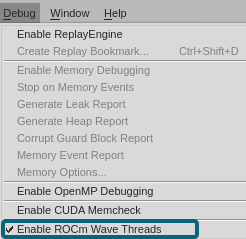
Click Debug > Enable ROCm Wave Threads to toggle wave-thread mode on and off for the focus process. When the checkmark is visible, wave-thread mode is on; click this menu item again to return to agent-thread mode (no checkmark).
In the CLI
In TotalView’s Command Line Interface, use the drocm command to turn wave-thread mode on and off and to view the status of the mode, as follows:
-
Turn on wave-thread mode.
drocm wave_threads true
-
Turn off wave-thread mode.
drocm wave_threads false
-
Show the status of wave-thread mode for the focus processes.
drocm wave_threads