Individual Execution Commands
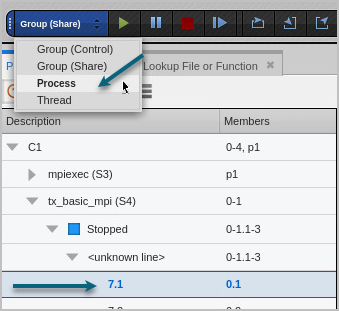
In the UI, the focus of any execution command is the thread selected in the Processes and Threads view, and the width control selected from the Focus menu. In Figure 109, the thread of interest (TOI) is 7.1, and the width is process; TotalView will advance all threads in the process that contains the TOI, or process 7.
Figure 109. The Focus menu in the UI
The term goal identifies the location at which a given command will stop executing. For example, for a Step command, the goal is the “next line,” even if it’s in a different subroutine, while for a Run to command, the goal is the selected line. A Go command has no defined goal.
Table 17 defines the default action each execution command takes. Execution commands all default to process width if no other width is provided.
|
Command |
Default action |
|
Go |
Continues all processes and threads in the current focus. |
|
Halt |
Stops all processes and threads in the current focus. |
|
Kill |
Kills all target processes in the current focus. If, however, you kill the primary process for a control group, all processes in the control group are killed. |
|
Restart |
Kills all processes in the current control group, then restarts the process that was in the current focus. |
|
Next |
Steps one source line, stepping over any subroutine calls. |
|
Step |
Steps the thread of interest one source line while allowing other threads in the process to run freely. If a statement in a source line call a subroutine, this command steps into the function. |
|
Out |
Runs a thread until it returns from either of the current subroutine or one or more nested subroutines. When using the default process width, all threads in the process that are not running to this goal run free. |
|
Run To |
Runs the process until a selected location is reached, usually a line in the Source view. If this command is applied to a group, its behavior differs depending on the width. |