Using Barrier Points
Because threads and processes are often executing different instructions, keeping threads and processes together is difficult. The best strategy is to define places where the program can run freely and places where you need control. This is where barrier points come in.
To keep things simple, this section only discusses multi-process programs. You can do the same types of operations when debugging multithreaded programs.
On this page:
The Case for Barrier Points
Why breakpoints don’t work (part 1)
If you set a breakpoint that stops all processes when it is hit and you let your processes run using the Group > Go command, you might get lucky and have all of your threads reach the breakpoint together. More likely, though, some processes won’t have reached the breakpoint and TotalView will stop them wherever they happen to be. To get your processes synchronized, you would need to find out which ones didn’t get there and then individually get them to the breakpoint using the Process > Go command. You can’t use the Group > Go command since this also restarts the processes stopped at the breakpoint.
Why breakpoints don’t work (part 2)
If you set the breakpoint’s property so that only the process hitting the breakpoint stops, you have a better chance of getting all your processes there. However, you must be careful not to have any other breakpoints between where the program is currently at and the target breakpoint. If processes hit these other breakpoints, you are once again left to run processes individually to the breakpoint.
Why single stepping doesn’t work
Single stepping is just too tedious if you have a long way to go to get to your synchronization point, and stepping just won’t work if your processes don’t execute exactly the same code.
Why barrier points work
If you use a barrier point, you can use the Group > Go command as many times as it takes to get all of your processes to the barrier, and you won’t have to worry about a process running past the barrier.The Root Window shows you which processes have hit the barrier, grouping all held processes under Breakpoint in the first column.
Barrier Point Illustration
Creating a barrier point tells TotalView to hold a process when it reaches the barrier. Other processes that can reach the barrier but aren’t yet at it continue executing. One-by-one, processes reach the barrier and, when they do, TotalView holds them.
When a process is held, it ignores commands that tell it to execute. This means, for example, that you can’t tell it to go or to step. If, for some reason, you want the process to execute, you can manually release it using the dunhold command.
dfocus p dunhold -process
When all processes that share a barrier reach it, TotalView changes their state from held to released, which means they no longer ignore a command that tells them to begin executing.
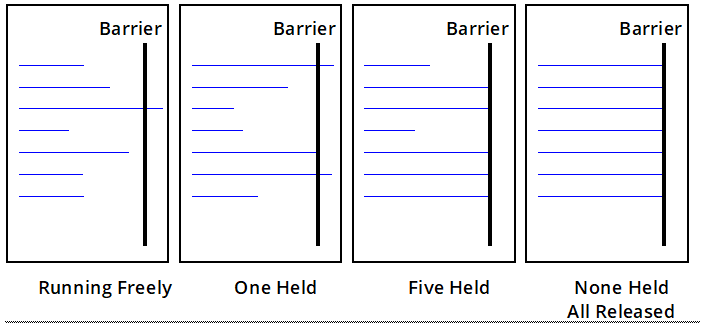
The following figure shows seven processes that are sharing the same barrier. (Processes that aren’t affected by the barrier aren’t shown.)
-
First block: All seven processes are running freely.
-
Second block: One process hits the barrier and is held. Six processes are executing.
-
Third block: Five of the processes have now hit the barrier and are being held. Two are executing.
-
Fourth block: All processes have hit the barrier. Because TotalView isn’t waiting for anything else to reach the barrier, it changes the processes’ states to released. Although the processes are released, none are executing.
Figure 31. Running to Barriers
For more information on barriers, see Barrier Points.
|
dhold |
|
|
dunhold |