Setting a Barrier Breakpoint
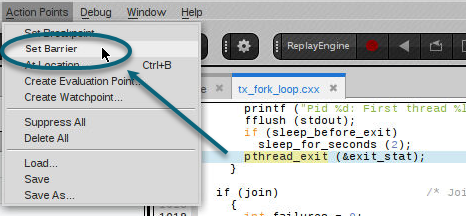
Set a barrier breakpoint in the same way as a regular breakpoint: by either selecting the line in the Source view and selecting Action Points > Set Barrier, or by right-clicking on the line and selecting Set Barrier from the context menu.
Once the barrier point is set, customize its properties by right-clicking on the barrier point in either the Source view or the Action Points view, and selecting Properties to open the Modify Barrier Point dialog:
Figure 29. Modify Barrier Point Property dialog
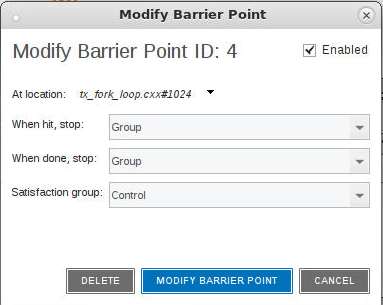
You most often use barrier points to synchronize a set of threads. When a thread reaches a barrier, it stops, just as it does for a breakpoint. The difference is that TotalView prevents—that is, holds—each thread reaching the barrier from responding to resume commands (for example, step, next, or go) until all threads in the affected set arrive at the barrier. When all threads reach the barrier, TotalView considers the barrier to be satisfied and releases all of the threads being held there. They are just released; they do not continue.That is, they are left stopped at the barrier. If you continue the process, those threads also run.
If you stop a process and then continue it, the held threads, including those waiting at an unsatisfied barrier, do not run. Only unheld threads run.
When hit, stop:
In the UI, the When hit, stop drop-down menu sets which other threads TotalView stops when execution reaches the barrier point.
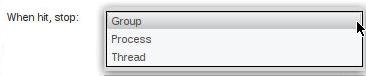
The UI options include the following:
|
Scope |
Stopped Threads |
|
Group |
Stops all threads in the current thread’s control group. |
|
Process |
Stops all threads in the current thread’s process. |
|
Thread |
Stops only this thread. |
You can also specify these options from the CLI by using the dbarrier command.
dbarrier -stop_when_hit
After all processes or threads reach the barrier, TotalView releases all held threads. Released means that these threads and processes can now run.
When done, stop
In the UI, the When done, stop drop-down menu defines what else it should stop.
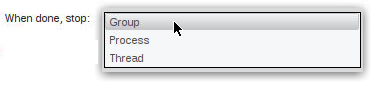
The UI options include the following:
|
Scope |
Stopped Threads |
|
Group |
Stops all threads in the current thread’s control group. |
|
Process |
Stops all threads in the current thread’s process. |
|
Thread |
Stops only this thread. |
You can also specify these options from the CLI by using the dbarrier command.
dbarrier -stop_when_done