Modifying Arguments in an Open Session
All arguments or options that can be set while first configuring a session (see Options and Program Arguments) and can also be modified once the session has started.
Modify arguments in an existing session using either the UI or when loading a program from the command line, i.e. when entering totalview <program_name> into your shell. (See Starting a Session from your Shell.)
To modify arguments in the UI:
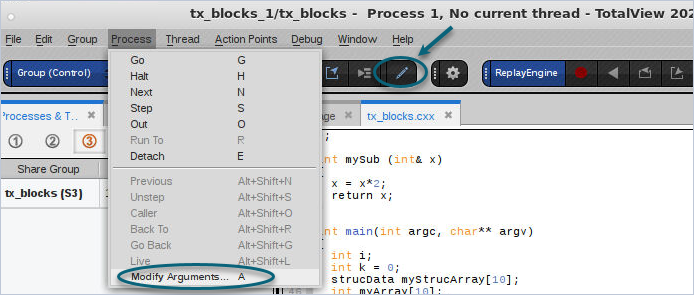
1. From within a debugging session, choose the Process menu, and then Modify Arguments. Alternatively, click the Modify Arguments ( ) icon on the toolbar or press the shortcut key A.
Figure 13. Modify Arguments drop-down
The Session Editor launches.
Figure 14. Modifying Arguments in the Session Editor
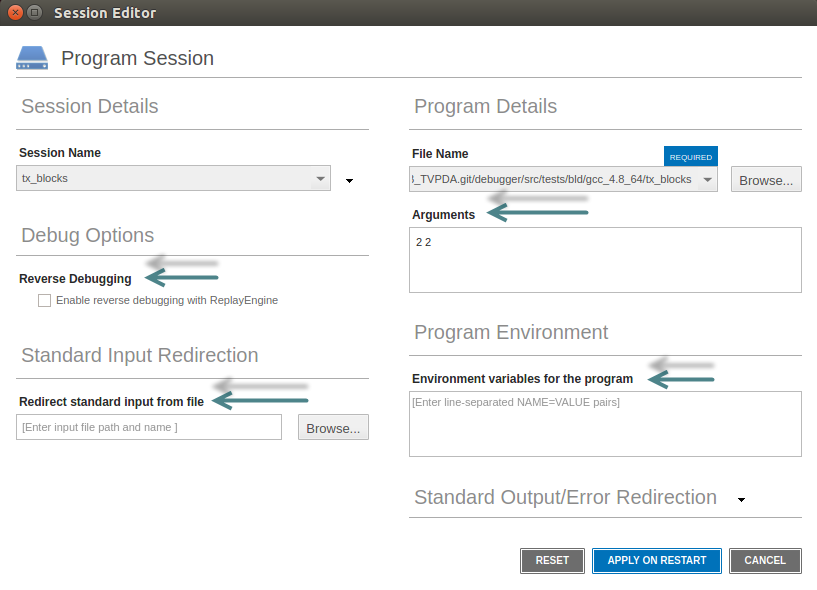
2. Enter any modified arguments or options in either
Reverse Debugging: Toggle this on or off.
Arguments: Change any arguments to your program
Environment variables: Enter or edit variables.
Standard input: Enter or edit any input files.
3. Click Apply on Restart.

Modified arguments have no effect until you restart your program, selecting either Go, Kill or Restart.