Transforming the Stack
One of the advanced features that TotalView provides is a fully unified Call Stack of all the Python and C/C++ frames. Further, the Call Stack removes all the noisy "glue" calls that tie together the two languages, displaying a concise, developer-oriented view of the call from Python into C/C++.
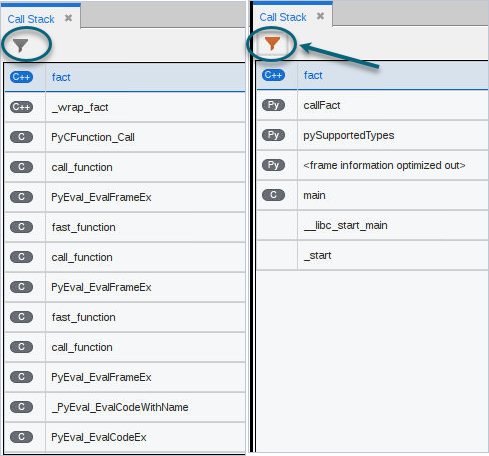
Figure 89 shows an untransformed stack on the left and a transformed stack on the right. The transformed stack is how the developer conceptually thinks about the calls in a program.
Figure 89. Untransformed Python Stack vs. Transformed Python Stack
 ). To preserve this setting, edit the session to ensure that “Enable call stack filtering for Python” is checked under the Python Debugging section. See Starting a Python Debugging Session.
 Controlling the transform feature
When TotalView detects you are debugging a Python program, TotalView enables transforming the Python call frame information from the Python interpreter.
You can disable or re-enable stack trace filtering using one of the following methods:
Click the transform button () in the Call Stack view to toggle the transform on or off.
Enter the following command in the Command Line view: dstacktransform | disable | enable
Use a state variable to control the filtering of the stack:
stack_trace_transform_enabled (defaults to false)
This variable controls whether any stack filtering occurs.
Controlling the transformation of the stack is handled by TotalView's Stack Transformation Facility (STF), a rule-driven capability that allows stack frames to be matched against regular expressions, and then applying filters to the matching frames.
|
Creating stack transformations |
|
|
General information on creating custom type transformations |