Patching Programs
Evalpoints let you patch your programs and route around code that you want replaced, supporting branching around code that you don’t want your program to execute and adding new statements. In many cases, correcting an error means that you will do both: use a goto to branch around incorrect lines, and then add corrections.
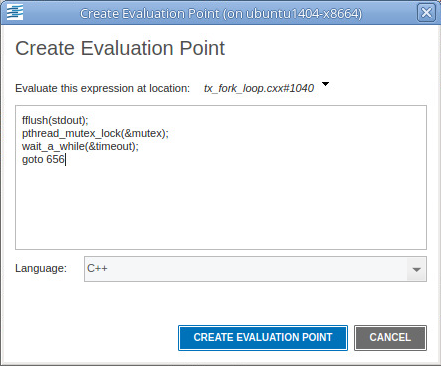
For example, suppose you need to change several statements. Just add these to an action point, then add a goto (C) or GOTO (Fortran) statement that jumps over the code you no longer want executed. For example, the evalpoint in Figure 26 executes three statements and then skips to line 656.
Figure 26. Evalpoint expression with GOTO
On this page:
Branching Around Code
The following example contains a logic error in which the program dereferences a null pointer:
1 int check_for_error (int *error_ptr)
2 {
3 *error_ptr = global_error;
4 global_error = 0;
5 return (global_error != 0);
6 }
The error occurs because the routine that calls this function assumes that the value of error_ptr can be 0. The check_for_error()function, however, assumes that error_ptr isn’t null, which means that line 3 can dereference a null pointer.
Correct this error by setting an evalpoint on line 3 and entering:
if (error_ptr == 0) goto 4;
If the value of error_ptr is null, line 3 isn’t executed. Note that you are not naming a label used in your program. Instead, you are naming one of the line numbers generated by TotalView.
Adding a Function Call
The example in the previous section routed around the problem. If all you wanted to do was monitor the value of the global_error variable, you can add a printf() function call that displays its value. For example, the following might be the evalpoint to add to line 4:
printf ("global_error is %d\n", global_error);
TotalView executes this code fragment before the code on line 4; that is, this line executes before global_error is set to 0.
Correcting Code
The following example contains a coding error: the function returns the maximum value instead of the minimum value:
1 int minimum (int a, int b)
2 {
3 int result; /* Return the minimum */
4 if (a < b)
5 result = b;
6 else
7 result = a;
8 return (result);
9 }
Correct this error by adding the following code to an evalpoint at line 4:
if (a < b) goto 7; else goto 5;
This effectively replaces the if statement on line 4 with the code in the evalpoint.
Using Programming Language Constructs
You can also use programming language constructs in an evalpoint. For example, here’s a trivial example of code that can execute:
int i, j, k;
j = k = 10;
for (i=0; i< 20; i++)
{
j = j + access_func(i, k);
}
j;
This code fragment declares a couple of variables, runs them through a for loop, then displays the value of j. In all cases, the programming language constructs being interpreted or compiled within TotalView are based on code within TotalView. TotalView is not using the compiler you used to create your program or any other compiler or interpreter on your system.
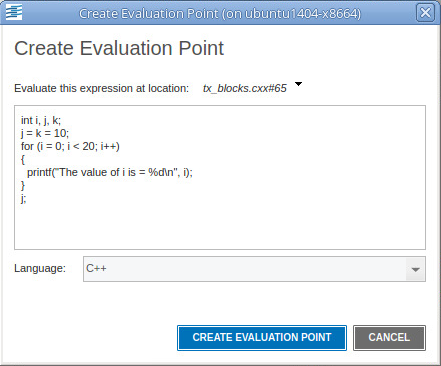
Notice the last statement in the Create Evaluation Point dialog in Figure 27. The results are printed in the shell in which TotalView is running, displayed in Figure 28.
Figure 27. Displaying the Value of the Last Statement
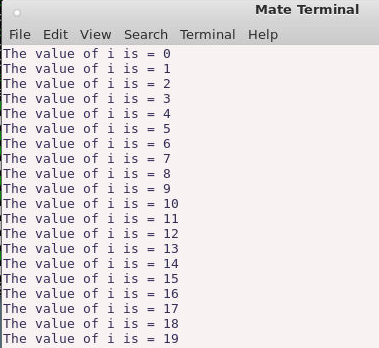
TotalView assumes that there is always a return value, even if it’s evaluating a loop or the results of a subroutine returning a void. The results are, of course, not well-defined. If the value returned is not well-defined, TotalView returns a zero.
The code within an evalpoint does not run in the same address space as that in which your program runs. Because TotalView is a debugger, it knows how to reach into your program’s address space. The reverse isn’t true: your program can’t reach into the TotalView address space. This forces some limitations upon what you can do. In particular, you cannot enter anything that directly or indirectly needs to pass an address of a variable defined within the TotalView expression into your program. Similarly, invoking a function that expects a pointer to a value and whose value is created within TotalView can’t work. However, you can invoke a function whose parameter is an address and you name something within that program’s address space. For example, you could say something like adder(an_array) if an_array is contained within your program.